A few times I recorded a video with my camera turned in portrait mode. It looks nice on the camera screen but, as soon as you watch it on the PC, you realise something went wrong… :-|
Fortunately there is software that can fix this. I tried Avidemux and was surprised at how easy it was.
Avidemux is a nice open-source video editor that runs on Windows, Mac OS X, Linux and BSD.
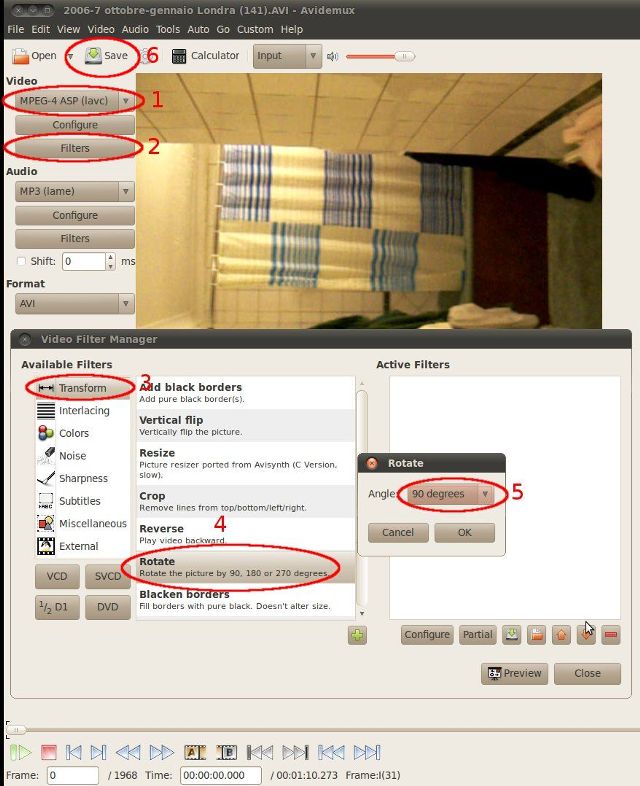
Here are the steps (see screenshot below):
- Select the format of the “Video” to produce
- Open the “Filters” window
- Select the “Transform” category
- Choose “Rotate” and add it
- Pick the rotation you need, click OK and close
- Save the file and let Avidemux do the job
Enjoy!
is rotating a video by avidemux lossless?
I think you always lose something because the video needs to be decompressed, rotated, and recompressed…
Thanks, it works nicely!
I just tried to rotate an iPhone .mov file 90 degrees. AviDemux took all my settings, but it did no rotation. What am I missing?
I followed these steps, and as per the person above it does not work.
I then realized that the filters were not being applied when video was set to copy.
As per the first photo, you must select a video output, e.g. MPEG-4.
When you do this it processes the applied filter.
It is amazing how quickly this tool can work with very large files. Windows Live Movie Maker takes 5 minutes to process the large files and then crashes when you ask to save.
Enjoy.
Having gone back and read the post more, it does actually say you can’t just leave it as copy. Clarifying my result.
good tip, thanks for sharing.
Is it possible in Avidemux (or any other free programme) to rotate a video a few degrees (say, 5), or are 90, 180, and 270 degrees the only amounts possible?
I’m not sure about other programs but Avidemux seems to do only 90, 180 and 270 (I just checked it on version 2.5.4).
Works without quality loss, perfect.
It works just fine. TY.
A little wisdom goes a long way.
Thanx, worked great !!!!!!!!
I did exactly as described, but it won’t work :( i cannot save it. Is there no easier way to just rotate a video ?
I tried this with Avidemux 2.5.2.
Are you using the same version?
PS: If you find an easier way to rotate a video let me know and I’ll update the post… :-P
Doesn’t work. Setting the filter is easy, but the File -> Save operation does not actually *apply* the rotate filter.
to Rotate a video with Avidemux
“you must select a video output”
top left corner of Avidemux:
File Recent Edit
under this are 3 icons:
Open Video Save Video Information
under this are the words:
Video Decoder
under this is a button labelled:
Configure
under this are the words:
Video Output
below this is a pull down menu:
Copy
CLICK on Copy and change it to:
Mpeg4 ASP (xvid4)
now drop down 2 buttons and click Filters…
double-click Rotate then 90 degrees then Close
click Save Video and a window will appear:
Encoding…
(this will take a few minutes to save the video)
easy! using Avidemux v2.6.12
screenshot = http://i6.imageban.ru/out/2016/08/14/ff59ac1e282099f20798617e050f2336.png
Thanks. What about “output format?”
Just worked fine with the Windows Version (2.7.0) and a MOV file.
I am impressed. A .MOV file taken from iPhone 6 was upside down. AVIDemux on Windows 7 (64-bit) rotated it by 180 degrees in seconds without any problem. I is a great tool!
Tried this on 2.6.14 and worked like a charm. You made it really easy to follow. Thanks!