Firefox – prevent websites from refreshing

Fed up with websites and tabs continuously reloading themselves and using resources unnecessarily? Me too!

In Firefox, you can disable this from the about:config page. Type about:config in the address bar, accept the warning, and search for:

accessibility.blockautorefresh

Set it to true. Problem solved — pages can no longer auto-refresh without your permission.

You can also keep an eye on which tab uses the most resources by typing about:performance in the address bar. Firefox shows a list of open tabs with their CPU and memory usage, making it easy to find and close the resource hogs.

Enjoy!

Drush intro – Drupal

Drush is a command-line shell interface for Drupal. It lets you do almost anything you would do through the Drupal admin interface — enabling modules, clearing caches, running cron, backing up the site — all from the terminal.

Installation

The preferred way to install Drush is via the official PEAR channel, but it can also be installed manually on a shared server.

Backup and restore

archive-dump backs up the codebase, files, and database into a single file:

drush archive-dump
drush archive-restore

Common commands

drush pm-download 
drush pm-enable 
drush pm-disable 
drush cc all
drush cron
drush sql-dump
drush uli

Enjoy!

PHP UK Conference 2012 slides – London

As mentioned in the last post, I was going to go to the PHP Conference in London.
Well, I have been! :-)
It was the first time for me but was exactly as expected. Very interesting, entertaining, and absolutely inspiring…
Unfortunately the slides are not always easy to find as I haven’t found a single place where to find them all.
Here I will list all slides (or resources in general) found about a particular talk.
If you know where to find some of those marked as “not found yet” don’t hesitate to write to andrea [at] opensourceisbetter.com or leave a comment.

A look at PHP in 2012
(Rasmus Lerdorf)
Slides

Big Data web – Big Data science – Big Data mining
(James Littlejohn)
Slides

Powering your website with real-time data
(Bert Van Hauwaert)
Slides

The journey towards Continuous Integration
(Sebastian Marek)
Slides

Data abstraction in large web applications
(Brandon Savage)
Slides

Develop & deploy using hybrid cloud strategies
(Thijs Feryn)
Slides

PHP 5.4: the new bits
(Davey Shafik)
Slides

Creative Coding – why “doing nothing” doesn’t mean you’re not working
(June Henriksen)
Slides

Security audits as an integral part of PHP application development
(Sijmen Ruwhof)
Slides

To a thousand servers and beyond: scaling a massive PHP application
(Nikolay Bachiyski)
Slides

Distribute the workload
(Helgi Þorbjörnsson)
Slides – Day 1Slides – Day 2

Profiling PHP applications
(Derick Rethans)
Resources

Scaling communication with Continuous Integration
(LB Denker)
Slides

Building and deploying applications with Phing
(Michiel Rook)
Slides

Teaching your machine to find fraudsters
(Ian Barber)
Slides

Try {getting people to come to a talk about exceptions}
(Ed Van Beinum)
Slides

Challenges at scale: extreme data and platforms at eBay
(Hugh Williams)
(not found yet)

Masterizing PHP Data Structure 102
(Patrick Allaert)
Slides

Monitoring your back-end for speed and profit
(Andy ‘Bob’ Brockhurst)
Resources

Open source search: an analysis
(Justin Finkelstein)
Slides

Cheat your way with UX
(Stephanie Troeth)
Slides

MySQL update
(Dave Stokes)
(not found yet)

Recognizing smelly code
(Harrie Verveer)
Slides – PDF file

HTML5 for PHP developers
(Andrew Betts)
(not found yet)

Introduction: MongoDB with PHP
(Derick Rethans)
Resources

PHP under the hood
(Johannes Schlüter)
Slides

The Misguided Manager
(Zoë Slattery)
Slides

Hope you find this useful. :-)
Enjoy!

PHP UK Conference 2012 schedule – London

This year, for the first time, I will be attending to the PHP Conference in London. There are going to be so many interesting talks.
Have a look with your eyes..
Here you find the official schedule. Unfortunately it’s still provisional.

Anyway I took the time to create a simple spreadsheet to organize, with my colleagues, what talks we will be attending.
Here you can download it: PHP UK Conference 2012 Schedule Spreadsheet.

For those of you who haven’t registered to the PHP conference yet, you can register with a significant discount, instead of the original price, thanks to the PHP London meetup.

I’ll see you there! :-)

Enjoy the conference! :-)

How to run a system command in background from PHP

If you are at the command line and want a process to run in the background, you add an & at the end of the command:

sleep 10 && echo "Done!" &

The same approach works from PHP when you need to run a long process without making the user wait:

exec("tar czf /backup/site.tar.gz /var/www > /dev/null 2>&1 &");

The > /dev/null 2>&1 discards output so PHP doesn’t wait for it. The & sends the process to the background.

PHP functions compared

  • exec() — returns last line of output, does not block if output is redirected
  • shell_exec() — returns full output as a string
  • system() — outputs directly to the browser
  • passthru() — for binary output

Using nohup and PIDs

exec("nohup tar czf /backup/site.tar.gz /var/www > /dev/null 2>&1 & echo $!", $output);
$pid = $output[0];

nohup keeps the process alive after PHP exits. The PID lets you monitor or kill it later.

Enjoy!

How to install Firefox 5 on Ubuntu Lucid

The Firefox version bundled with Ubuntu Lucid is still 3.6. It is stable but definitely not the fastest browser around, especially with Chrome and Chromium raising the bar on speed.

The best way to keep Firefox up to date is to let Mozilla do the work with their own repository.

sudo add-apt-repository ppa:mozillateam/firefox-stable
sudo apt-get update
sudo apt-get install firefox

This adds the Mozilla team PPA and installs the latest stable Firefox. After that, updates come through the regular apt-get upgrade cycle.

Enjoy!

IDE Netbeans 7.0 is out: PHP, Java SE/EE and C/C++

Netbeans 7 is out. I have been using it for PHP, at work as well as at home, for almost two years and I have to say it has become by far my favourite PHP IDE.

The Netbeans IDE started in 1996 for Java. PHP support came with version 6.5 in late 2008. Since then, every release has improved significantly.

What I like about it is that it just works out of the box — the PHP code completion, the debugger integration with Xdebug, the SVN/Git support built right in. You don’t need to piece together half a dozen plugins to get a productive environment.

One of my favourite features is the ability to search across files with Alt+Shift+O. It’s one of those things you don’t appreciate until you try going back to an IDE that doesn’t have it.

Curious about it? Download the version you need from the Netbeans site and give it a try.

Enjoy it!

Mediawiki: disable account creation

When you install MediaWiki, new user registration is enabled by default. Anyone can create an account and start editing. That’s fine for a public wiki, but not always what you want — especially for a private or company wiki where you want to control who has access.

There’s no toggle for this in the settings UI, but it’s a single line in the config file.

Disable registration

Add this line to your LocalSettings.php file:

$wgGroupPermissions['*']['createaccount'] = false;

This tells MediaWiki to deny the createaccount permission to the * group (which means all users, including unauthenticated visitors).

Allow only certain users to create accounts

If you want only logged-in users to be able to create new accounts (for example, so existing users can invite others):

$wgGroupPermissions['*']['createaccount'] = false;
$wgGroupPermissions['user']['createaccount'] = true;

Or if you want only sysops (admins) to create accounts:

$wgGroupPermissions['*']['createaccount'] = false;
$wgGroupPermissions['sysop']['createaccount'] = true;

After making the change, clear the MediaWiki cache if needed (php maintenance/runJobs.php) and the login/register page will immediately reflect the new permissions.

Enjoy!
How to create a simple WordPress Child Theme

A child theme lets you customise an existing WordPress theme without losing your changes when the parent theme updates. Every time the parent theme is updated, any files you edited directly get overwritten. A child theme avoids this.

Start by creating a folder and a style.css file that declares the parent theme:

/*
Theme Name:     My Twenty Ten Child
Theme URI:      https://www.opensourceisbetter.com/
Description:    Child theme for the Twenty Ten theme
Author:         Andrea
Template:       twentyten
*/

The Template line must match the folder name of the parent theme exactly. Activate the child theme from Appearance > Themes.

For the styles to work, create a functions.php file to enqueue the parent styles:

function my_theme_enqueue_styles() {
    wp_enqueue_style('parent-style', get_template_directory_uri() . '/style.css');
}
add_action('wp_enqueue_scripts', 'my_theme_enqueue_styles');

Now you can edit the child theme files freely. Add custom CSS to style.css, override template files by copying them from the parent theme, and add functionality through functions.php — all without touching the parent theme.

That is it!

Web Developer Tools app Review

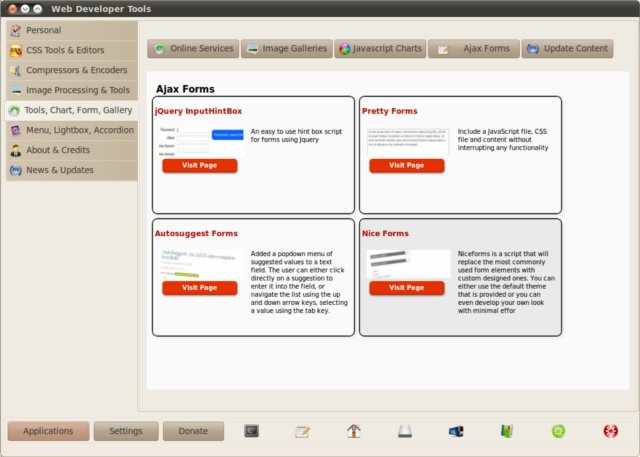
WDT (Web Developer Tools) is a suite of many different tools for web developers. Not all of them are useful to me but they might be to you… ;-)

It includes an HTTP header viewer, an HTML/CSS inspector, a JavaScript console, a cookie manager, and more. All packed into a single app.

Web Developer Tools screenshot

For instance, I find it useful how quickly you can inspect the HTTP headers of a page to debug redirects or caching issues. It is the kind of tool that saves you from opening Firebug or Chrome DevTools for quick checks.

Give it a try if you do any web development! :-)